


Filming a tennis match is relatively easy these days. A camera, a GoPro, or even a smartphone is enough to record an entire match. However, turning that footage into an enjoyable video can quickly become a very time-consuming task.
With conventional video editing software, you have to identify each rally, trim the clips, remove the downtime, possibly add a scoreboard, keep the score up to date, and then create a thumbnail before exporting the video.
EWPV Tennis Video Editor was developed to simplify all these steps by bringing together the tools needed to edit and analyze tennis matches in a single application.
Available for Windows, it comes in a free version and a Pro version.
Official website and download:
https://tennis-video-editor.ewpv.org/
Or on the Windows Store here:
https://apps.microsoft.com/detail/9ng26krc9gvq
Video editing software designed specifically for tennis matches
What makes EWPV Tennis Video Editor different is the way it organizes editing around the individual points of a match.
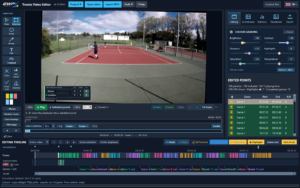
Unlike a general-purpose video editor, it does more than simply cut clips on a timeline. The software also lets you assign a result to each point, calculate the match score, and display it directly in the video.
The aim is to make it easier to create full-match videos, highlights, or compilations of the best rallies.
Easily trim individual points from a match
The first step in editing a tennis match is usually removing the downtime: collecting balls, changing ends, preparing to serve, breaks between rallies, and so on.
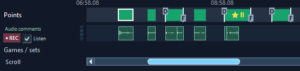
EWPV Tennis Video Editor lets you mark the start and end of each point directly during playback, notably using the D and F keyboard shortcuts.
You can then fine-tune the boundaries of each segment on the timeline, using zoom and frame-by-frame navigation.
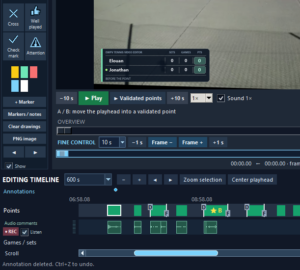
You can also play the selected points back-to-back to check the transitions and review the edited result.
The result is a video focused on the rallies, without having to manually manage dozens of separate clips.
A scoreboard built directly into the video
This is one of the software's most useful features.
Once you have entered the players' names and the match format, you simply indicate who won each point.
The software automatically updates the score, including points, games, sets, advantages, and tie-breaks.
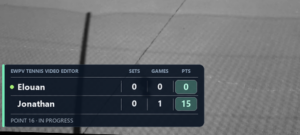
A scoreboard can then be displayed directly in the video. Several designs are available depending on the version, with options to customize its size and position.
This eliminates the need to create a scoreboard manually in a conventional video editor and update it after every point.
Create match highlights and best-point videos
Not every match needs a full-length video.
EWPV Tennis Video Editor lets you choose which rallies to keep and mark your favorite points.
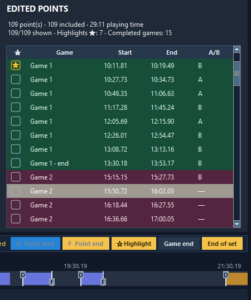
You can create different edits from the same recording:
- A complete match with the downtime removed.
- A highlights video featuring selected rallies.
- A compilation of the match's best points.
- A selection of clips for technical or tactical analysis.
The software also lets you save and reopen your projects so you can continue editing later.
Annotate videos to analyze play
The Pro version includes annotation tools that are particularly useful for coaches and players who want to analyze their performance.
You can add arrows, circles, text, symbols, or freehand drawings directly onto the video image.
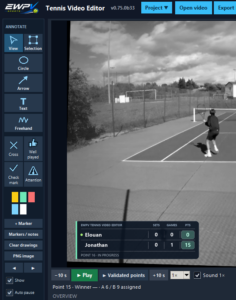
These tools make it easy to highlight court positioning, ball trajectories, movement, or tactical decisions.
Annotations can be edited, and annotated images can be exported as PNG files.
The software also lets you record audio commentary synchronized with the points of the match. This makes it possible to add spoken explanations while keeping the original match audio.
Statistics to better understand the match
EWPV Tennis Video Editor goes beyond video editing.
By recording results point by point, it also lets you view match statistics and compare the two players.
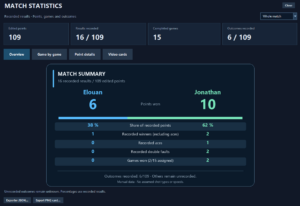
An automatic video analysis feature is also available to identify playing sequences and make them easier to review.
This analysis is optional, and its results can be checked and corrected in the editor.
These features can be useful both for reviewing a match and for preparing an analysis session with a coach.
A built-in tool for creating thumbnails
Once the editing is complete, there is often one final step: creating the thumbnail image for YouTube or a website.
EWPV Tennis Video Editor has its own thumbnail creation studio.
You can select a frame from the video, add a title, and adjust the colors, framing, and layout.
Several formats are available, including landscape, square, and portrait, with PNG or JPEG export.
This means you do not always need another application to prepare your video's presentation.
Export your videos as MP4 files
You can then export your edited video in MP4 format, with a range of settings depending on the software version.
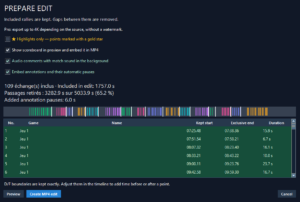
The export can preserve the original match audio and include the scoreboard.
The free version already supports Full HD exports without a watermark. The Pro version adds customization options and the ability to export in up to 4K, depending on the source resolution.
The software also supports GoPro footage and 4K video sources.
Two versions: Free and Pro
EWPV Tennis Video Editor is available in two editions.
EWPV Tennis Video Editor Free — Free
The free version already includes the main features needed to edit a tennis match: video import, point-by-point trimming, score tracking, a standard scoreboard, statistics, selection of the best rallies, and watermark-free Full HD MP4 export.
EWPV Tennis Video Editor Pro — €18.90 per year
The Pro version adds annotation tools, audio commentary, more scoreboard templates, additional thumbnail options, and advanced export features.
The free edition is therefore a great way to try the software before deciding whether you need the extra features of the Pro version.
Software worth discovering
EWPV Tennis Video Editor brings together all the steps involved in creating a tennis video in a single Windows application: trimming rallies, tracking scores, viewing statistics, adding annotations, creating thumbnails, and exporting the finished video.
Its main advantage is that it provides an environment specifically designed for tennis matches, reducing the many manual tasks usually required when using general-purpose video editing software.
Whether you want to share your matches on YouTube, save recordings of your best matches, or analyze specific passages of play, it is well worth a look.
Official website and download: